
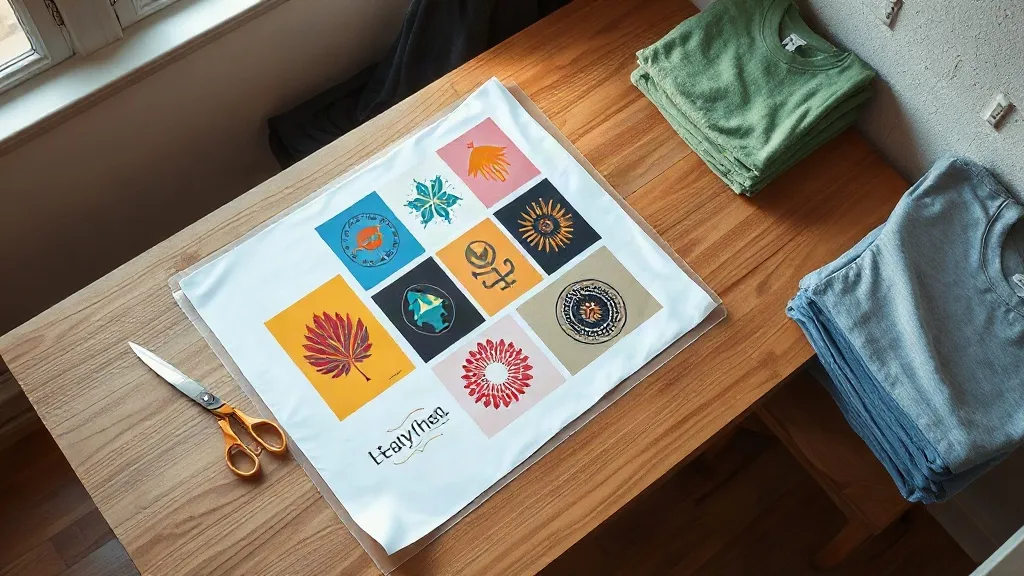
Walk into a small print shop on a Tuesday morning and you will usually see the same thing: a heat press warming up, a stack of blank tees on the table, and a laptop open to a transfer file that somebody built in a hurry. The shirts are fine. The press is fine. What quietly eats the profit is the film. Most small shops order transfers one design at a time, pay for the empty space around each print, and only notice the waste when the monthly supply bill arrives. A DTF Gangsheet is the fix, but only if you understand what it is and how to build one that actually fits your workflow.
What a DTF Gangsheet Really Is
A gangsheet is a single sheet of DTF film that holds multiple designs at once. Instead of ordering fifty individual transfers of one logo, you arrange several different graphics on one file, print them together, and cut them apart after pressing or before, depending on your process. The printer charges you for the sheet, not for each design, which is where the savings come from.
The concept is simple. The execution is where shops get into trouble. A poorly built gangsheet can waste more film than ordering singles, because you pay for the whole sheet whether or not every inch is used. The goal is not to cram as many designs as possible onto one page. The goal is to fill the sheet with designs you will actually sell, spaced in a way that lets you cut cleanly and press without guessing.
Why Small Shops Underestimate the Layout
There is a mental trap in transfer ordering. When you buy singles, the price per design feels concrete. When you buy a gangsheet, the price is spread across everything on the page, so it feels abstract. That abstraction is exactly why shops either overstuff the sheet or leave half of it empty.
Think about a typical order. You have a front logo at ten inches wide, a sleeve hit at three inches, and a back print at twelve inches. If you order those as singles, you pay for three separate runs of film. If you place them on one gangsheet with proper spacing, you pay for one sheet and use the leftover area for a few smaller designs you already know will sell, like a chest hit or a pocket logo. The savings do not come from magic. They come from using the space you already paid for.
The spacing mistake that costs the most
New shops tend to butt designs right up against each other to squeeze in more artwork. That works on paper and fails in the press room. DTF transfers need a cut margin, usually a few millimeters around each design, so you can trim cleanly without slicing into the print. If two designs share a border with no gap, you will either cut into one of them or leave a ragged edge that shows on the shirt. Leave a consistent gap, and the sheet stays usable.
Nesting, not stacking
Nesting means rotating and interlocking shapes so they use space efficiently. A tall design next to a wide one often leaves a gap that a small square logo can fill. Stacking means piling designs in rows and hoping the math works out. Rows look tidy in the design software and waste film in reality. Take five extra minutes to move small pieces into the gaps, and you will recover enough space for two or three extra transfers per sheet.
File Prep That Saves You a Reprint
The most common reason a gangsheet comes back wrong is not the printer. It is the file. A few habits will keep you out of that conversation.
- Work at 300 DPI at final print size. Scaling up a small file later softens edges and thickens fine lines.
- Keep all artwork on transparent backgrounds. White boxes behind logos turn into white rectangles on dark shirts.
- Convert text to outlines so fonts do not substitute on the printer's system.
- Set your cut lines as a separate layer or use a consistent gap, and tell your printer which method you used.
- Name the file with the sheet size, the date, and a short description, not just "final2."
If you send a file with a note that says "please make it fit," you have handed layout decisions to someone who does not know your customers. That is how you end up with a sheet full of designs that sell slowly and none of the ones that move.
Matching the Sheet to Your Actual Sales
Gangsheets reward planning, and planning starts with knowing what you sell. Pull your last thirty days of orders and sort them by design. You will usually find that a small number of graphics account for most of the volume, with a long tail of one-offs behind them. Build your sheet around the top sellers and use the remaining space for designs you are testing.
This is where a lot of shops go wrong in the other direction. They fill a sheet entirely with new designs, then discover half of them do not sell and the film is already printed. A safer ratio is to fill most of the sheet with proven artwork and reserve a smaller portion for experiments. You get reliable replenishment and a low-cost way to test new ideas on the same order.
A simple sizing habit
Before you build the file, sketch the sheet on paper. Mark the standard placements you use most: full front, left chest, sleeve, back. Then count how many of each you actually need for the next two weeks. That count becomes your layout plan. It sounds old-fashioned, and it prevents the most expensive mistake in transfer ordering, which is printing a sheet full of sizes you do not need.
Press Day: Turning One Sheet Into Many Shirts
A gangsheet changes your press workflow as much as your ordering. Instead of pulling a single transfer for a single shirt, you cut the pieces you need for the day's run and press them in batches. Two habits make this smooth.
- Cut all the transfers you need for the day before you start pressing. Stopping mid-run to trim film breaks your rhythm and increases mispresses.
- Keep a small tray or envelope for each design so cut pieces do not get mixed up. Similar logos on the same sheet are easy to confuse once they are separated.
Temperature and pressure matter as much here as with any DTF transfer. Follow your supplier's recommended settings for the film and the fabric, and do not assume a setting that worked on one blank will work on another. A heavier cotton tee and a lightweight poly blend can behave differently under the same press, and the difference shows up after the first wash, not on press day.
Storage and Reordering Without Guesswork
Printed transfers keep well if you store them properly. Keep them flat, away from heat and direct sunlight, and in a dry space. Humidity and heat are the two things that degrade the adhesive and the ink over time. A simple flat file or a labeled box near the press is enough for most small shops.
For reordering, track two numbers: how many of each design you press per week, and how long a sheet lasts. After a month you will know your real consumption instead of guessing. That data lets you order on a schedule rather than in a panic the night before a market, which is when rushed files and wrong sizes happen.
When a Gangsheet Is the Wrong Choice
It is worth saying plainly: gangsheets are not always the answer. If you sell one design in high volume and nothing else, a single-design order may be simpler and just as cost-effective. If your artwork changes constantly and you cannot predict what will sell, you may be better off with smaller runs until you have data. Gangsheets reward shops with a stable catalog and a clear sense of demand. For everyone else, they are a tool to grow into, not a shortcut.
Frequently Asked Questions
How many designs can I fit on a DTF Gangsheet?
It depends entirely on the size of the artwork and the sheet dimensions you order. A sheet full of small chest logos can hold many more pieces than one built around full back prints. The practical limit is not a number of designs but the usable area after cut margins and spacing. Plan the layout first, then count.
Can I mix different design sizes on the same sheet?
Yes, and you usually should. Mixing sizes is one of the main advantages of the format, because small pieces can fill the gaps left by larger ones. Just keep a consistent cut margin around every design so trimming stays predictable.
Do gangsheet transfers cost less per shirt than single transfers?
They often do, but the savings come from using the full sheet rather than from a lower unit price. If half the sheet is empty, the per-shirt cost can end up similar to ordering singles. The layout is what determines the real cost.
How long can I store printed DTF transfers before using them?
Stored flat in a cool, dry place and out of direct sunlight, most transfers remain usable for months. Heat and humidity are the main risks, so avoid storing them near a press or in a damp room. When in doubt, press a test piece before running a full order.
What file format should I send for a gangsheet?
Most suppliers accept standard vector or high-resolution raster files, but the details vary. Ask your printer what they prefer before you build the layout, and always confirm the sheet size and resolution so the file matches the production setup.